
TL;DR
Use Revoke.cash to check and remove dangerous token approvals by entering your wallet address before connecting.
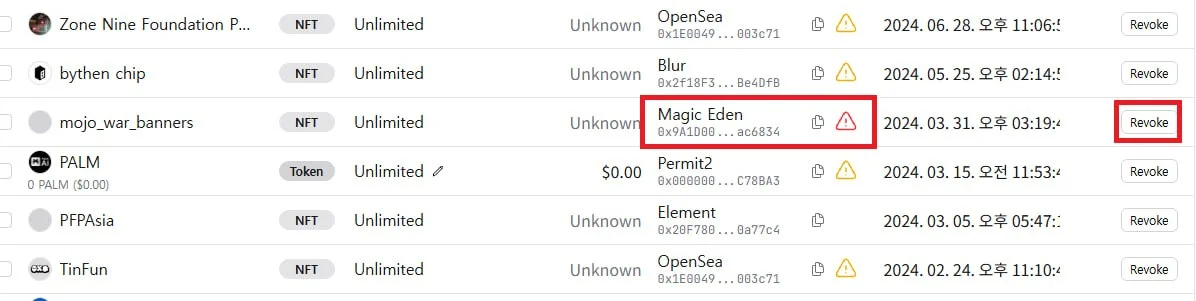
Always revoke red-flagged approvals first, as these pose the greatest security risk to your wallet.
Revoking costs gas fees, but setting transaction speed to low is fine since there is no time pressure.
How to Revoke Wallet Token Approvals
Revoking wallet approvals is one of the most important steps to protect your crypto assets from malicious contracts. Follow these steps to safely revoke permissions on your wallet.
Step-by-Step: Using Revoke.cash to Revoke Approvals
1. Visit Revoke.cash
2. Before connecting your wallet, enter your wallet address manually to review approvals safely.
3. Prioritize revoking any approvals highlighted in red first — these are the most dangerous.
4. Don’t forget to check and revoke approvals on other chains beyond Ethereum (ETH) as well.
Tips on Gas Fees When Revoking
Revoking approvals does require a small gas fee. Since there’s no urgency, set your transaction speed to low to save on gas costs — there’s no need to pay for a fast transaction here.
Business DM@doosingod(TG)
Hello, I’m DOOSIN. KOR NFT Influencer & DOOSIN ALPHA Founder
If you want to promote your project in South Korea, feel free to contact me!
I can gather Korean KOLs and handle the marketing.
SNS
Leave a Reply